How To Add A Clickable Link In A PDF Online For Free
Add an external link, email, or go to destination navigation to any PDF in your browser for free, no account required.

Background
PDFs support clickable link annotations, which are invisible interactive areas you draw over any part of a page. When a reader clicks that area in the downloaded PDF, it triggers a destination you configured. This makes PDFs much more dynamic, whether you are sharing a resume with contact links, a report with source references, or a document with an internal table of contents.
With the Edit PDF tool, adding a link annotation takes a few seconds. Open your PDF, select the link annotation tool, then click and drag to draw a rectangle over the area you want to be clickable. Three destination types are supported, each covered below.
- To link to a website or URL, use the external URL link type
- To link to an email address, use the email link type
- To link to a specific page and/or y-offset position within the same PDF, use the page destination link type
- Everything runs locally in your browser, no file uploads, no account required
Adding Links
To add a link annotation, open your PDF in the Edit PDF tool and look for the link option in the toolbar dropdown. Select it, then click and drag over the area of the page you want to make clickable. The three supported types are covered in the sections below.
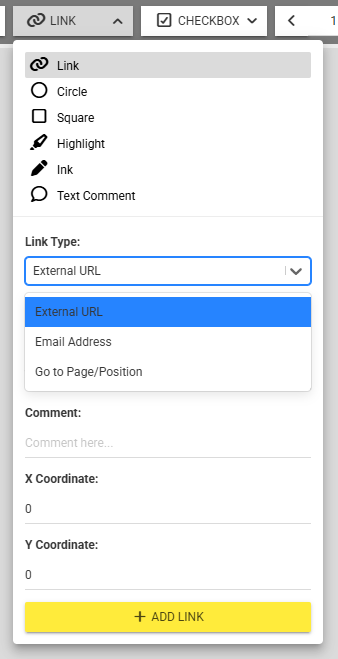
Link annotation types
External URL
The external URL type is the most common link annotation. Draw the annotation over any text or area on the page, choose the external URL option, and enter the full web address including the protocol, for example https://example.com. When a reader clicks that area in the downloaded PDF, their browser will open the URL.
This is useful for linking to a website, a product page, a source reference, or any resource that lives online.
The email link type works like an external URL but opens the reader's default mail client instead of a browser tab. Draw the annotation, choose the email option, and enter the target address. When clicked in the PDF, it will open a new email draft pre-addressed to that recipient.
This is useful on contact pages, resumes, or any document where you want readers to reach out directly from the PDF without having to copy and paste an address manually.
Page destination
The page destination type links to a specific page and position within the same PDF. Draw the annotation, choose the page destination option, and set the target page number along with the (optional) Y coordinates offset on that page. When clicked, the PDF reader will jump directly to that location.
This is useful for building a table of contents, cross-referencing sections, or linking a summary at the start of a document to a detailed section later on.
Tips
- Link over styled text: If you want a visible URL to also be clickable, draw the link annotation directly over the text. The text itself stays as-is, and the annotation makes it interactive.
- Email links: To link to an email address instead of a URL, use the format
mailto:name@example.comas the destination. - Testing your links: After downloading, open the PDF in a reader (like your browser's built-in viewer) to confirm each link opens correctly before sharing.
- Password-protected PDF? If a PDF is password-protected, you will need to enter the password to continue.
More articles

How To Edit A PDF Online For Free No Sign Up With Privacy In Mind
Learn how to edit PDF files online for free privately with our easy-to-use tools.
How To Add A Page To PDF Online For Free Easily
Add a page in any PDF directly in your browser, for free, with no uploads and no account required.
How To Extract Images From PDFs Online For Free
Extract embedded images directly in your browser online with ease for free.