How To Extract Attachments From PDFs Online For Free
Extract embedded attachments directly in your browser online with ease for free.

Background
Extracting attachments from PDFs can be a hassle. With our free tool, you can extract attachments from your PDFs online, without any watermark, and preview results before downloading.
- Navigate to the Extract Attachments from PDF page
- Upload a PDF
- Click Extract to preview results
- Download a single attachment or Download All as a zip
Step-by-step
1. Open the Extract Attachments Tool
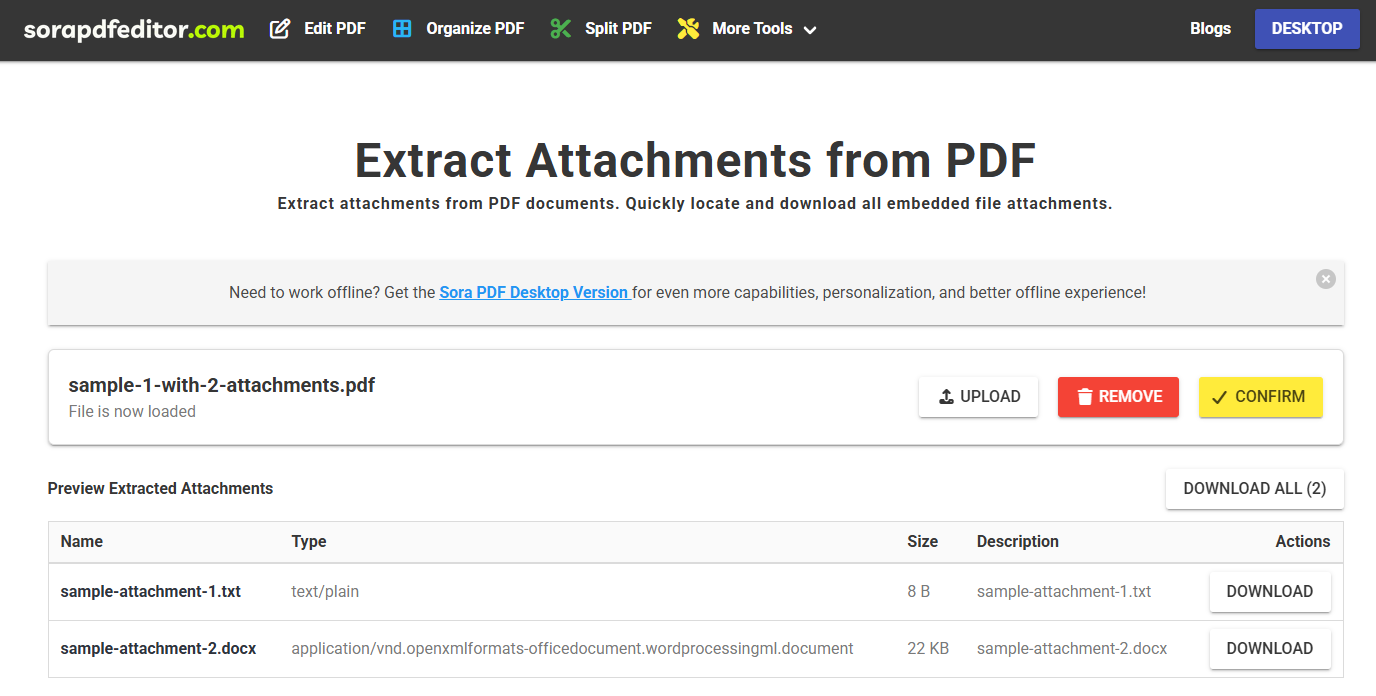
Navigate to the Extract Attachments from PDF page. You will be presented with the following screen:
2. Upload Your PDF
Click Upload your PDF file.
3. Extract & Preview
Click Extract. Found attachments will appear in the table. If none are found, an empty-state message will appear.
4. Download Results
You can either download your files individually by clicking on the Download Button on each row or use the Download All button to export all attachments as a zip file.
Tips
- Password-protected PDF? If a PDF is password-protected, you will need to enter the password to continue.
More articles

How To Extract Images From PDFs Online For Free
Extract embedded images directly in your browser online with ease for free.
How To Edit A PDF Online For Free No Sign Up With Privacy In Mind
Learn how to edit PDF files online for free privately with our easy-to-use tools.